Instead of remembering to book laundry every week, use your trash collection day to trigger a recurring calendar reminder, then confirm your pickup with Hampr. To schedule Hampr pickup on trash day, automate the reminder—not the booking: a calendar event does not place a laundry order.
- To schedule hampr pickup on trash day, use a recurring calendar reminder and confirm the actual laundry pickup separately.
- Hampr handles laundry pickup, washing, folding, and delivery; Google Calendar handles the reminder in this workflow.
- Keep laundry bags separate from trash bins and follow the pickup instructions attached to your order.
- Check holiday collection changes before moving either your reminder or your laundry appointment.
Why this matters
Trash day already gives your household a repeating cue. Pairing laundry planning with that cue gives you a regular moment to check the hamper, arrange pickup, and prepare the bag. No new household ritual required.
Hampr laundry pickup is best for households and businesses that want someone else to handle washing and folding. The trade-off is coordination: you still need to arrange the order, prepare the laundry, and follow the pickup instructions.
This 2026 workflow uses Google Calendar as a reminder system. It does not connect your municipal collection schedule to a laundry booking system, read your hamper, or change an existing order. Think of it as a nudge, not a tiny household manager.
The useful distinction is between remembering and reserving. Your calendar can repeat an event; only a confirmed service order tells you when the laundry pickup is scheduled.
Before you start
- Service access: Have access to your laundry service account and check whether your address is served. Have your current pickup instructions ready before choosing a preparation time.
- Calendar access: Use a Google account with permission to create events in Google Calendar. Set up the event in a desktop browser, and enable calendar notifications on the device you actually use.
- The gotcha: A recurring calendar event is not a recurring laundry order. Holiday trash collection changes also do not automatically change the calendar event or an existing pickup booking.
Use your actual 2026 municipal collection schedule as the starting point. A neighborhood group message is not a substitute for checking the date when a holiday changes the usual routine.
Choose who owns the task before setting reminders. In a shared household, one person should confirm the order; everyone else can help prepare the bag. Two people independently booking the same chore creates confusion, not extra clean socks.
Calendar trigger
Start with a reminder to arrange pickup, not a reminder to leave laundry outside. Booking comes first; bag placement follows the confirmed instructions.
Create the repeating event
- Open Google Calendar in a desktop browser and select Create, then Event.
- Enter a task-focused title, such as Arrange laundry pickup. Avoid a title that sounds like an already-confirmed appointment.
- Set the event date to your next trash collection day. Choose a time when you can check your laundry and complete the booking process, rather than automatically using the truck's arrival time.
- Select Does not repeat and choose the weekly option for that weekday. If your collection follows a different pattern, use Custom and match the recurrence to your actual schedule.
- In Description, write a short checklist: check collection date, review laundry needs, arrange pickup, record confirmation.
- Select Save.
Expected result: The calendar displays a repeating task on your collection weekday. It reminds you to act; it does not show proof of a laundry reservation.
For a weekly routine, the event repeats every 1 week. That is a setting you choose, not a claim about the service's booking frequency. If your household does not need laundry pickup each week, keep the reminder as a check-in rather than treating every occurrence as an obligation to order.
Add a useful notification
- Open the event and select Edit event.
- Use Add notification to set an alert before the event. A practical starting setting is 24 hours before, provided that leaves you enough time to arrange the pickup you want.
- Add another notification only if it serves a separate task. For example, a notification 30 minutes before your planning event can prompt you to check the hamper.
- Select Save and apply the change to the intended recurring events.
Expected result: Your calendar shows the chosen notification settings. Check device permissions as well; an event with notifications configured is not proof that your phone will display them.
These are suggested reminder intervals, not booking deadlines. Use the service instructions and your confirmed appointment to decide when laundry must be ready.
Pickup check
The calendar reminder should lead to a decision: arrange pickup, adjust the plan, or skip laundry this time. It should never lead straight to leaving an unconfirmed bag outside.
Confirm the actual appointment
- When the reminder appears, check whether the collection date is still correct. Review holiday changes, building notices, or other schedule updates relevant to your address.
- Check what needs washing. Separate anything whose care label requires treatment outside ordinary washing and drying, and review the service's current item instructions.
- Open your Hampr account and arrange the laundry pickup using the options presented there. Choose the appointment you can actually prepare for; do not assume the trash schedule determines it.
- Review the resulting order details. Confirm the pickup date, any stated time window, the address, and the instructions for handing over the laundry.
- Record the confirmed pickup in your calendar as a separate event. Use a title such as Confirmed laundry pickup so it cannot be confused with the planning reminder.
Expected result: You have a service confirmation and a calendar event that matches it. If you have only the recurring planning reminder, you have not completed the booking step.
Keep the recurring reminder separate from the confirmed appointment throughout 2026. They have different jobs: one prompts a decision, while the other records an arrangement you have already made.
Keep the household handoff clear
Put the confirmation details somewhere the person preparing the laundry can see them. A shared calendar event works when household members already use that calendar; otherwise, use your existing household message thread.
Record the essentials, not a novel. The useful details are who arranged the order, when pickup is expected, and where the laundry should be placed according to the order instructions.
One person confirms the booking; everyone follows the same confirmation. That keeps a helper from mistaking the weekly reminder for permission to create another order.
Bag preparation and completion
Your trash routine can cue laundry preparation without making the two pickup locations the same. Laundry belongs in the location specified for its collection, not wherever the bins happen to be.
Prepare the handoff
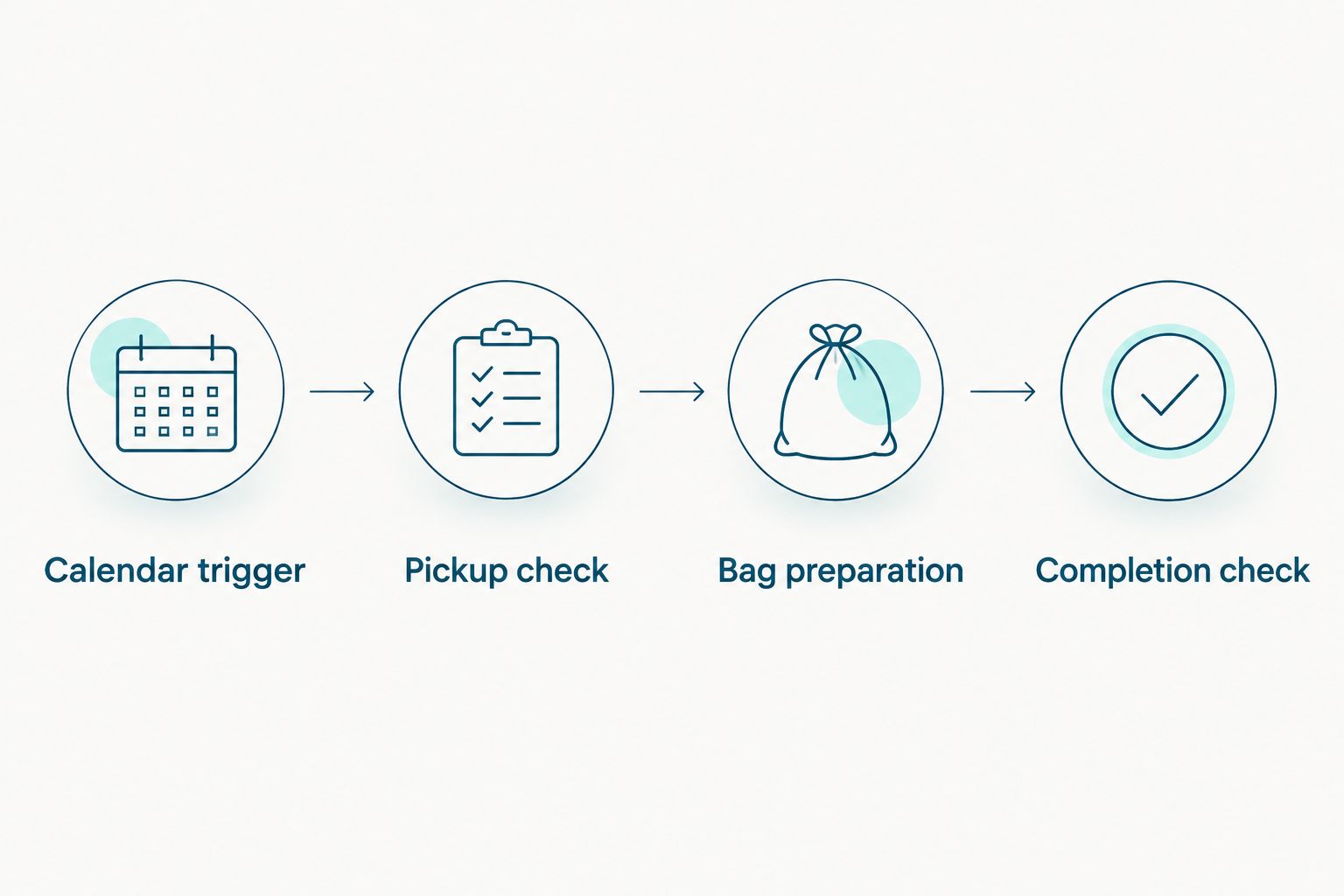
- Calendar trigger: Read the planning reminder and check whether the trash schedule has changed.
- Pickup check: Verify the actual laundry confirmation before preparing anything for collection.
- Bag preparation: Check pockets, follow garment care labels, and use the bagging instructions provided for your order.
- Completion check: Confirm that preparation is finished and that the bag is in the instructed location at the appropriate time.
Expected result: The laundry is prepared for the confirmed order, and nobody has to guess whether the reminder meant book, pack, or put outside.
Give clean laundry a landing spot indoors, too. A clear shelf or basket makes the return part of the routine instead of another pile waiting for a decision.
For the 2026 routine, keep the instructions specific enough that another household member can help. Write the actual agreed location in your private calendar rather than vague directions such as the usual place. Keep access codes and other sensitive details out of broadly shared event descriptions.
Do not place laundry beside trash bins just because both tasks share a calendar cue. Follow the laundry order instructions and keep bags clearly separate from waste and recycling.
Use dated reminders when trash collection changes
A repeating weekday reminder suits a stable collection schedule. When your municipal calendar lists exceptions, use dated planning reminders for those affected weeks instead.
This second workflow still automates notifications, not bookings. You enter the correct dates; Google Calendar reminds you when they arrive.
| Reminder workflow | Best for | Advantage | Limitation |
|---|---|---|---|
| Recurring weekday reminder | Households with a steady collection weekday | One repeating event keeps the planning cue visible | You must review exceptions and change affected occurrences |
| Dated collection reminders | Households following a published exception schedule | Each reminder can match the listed collection date | You must enter and maintain the dates yourself |
To use the dated version:
- Review the published 2026 collection schedule for your address.
- Create a separate event for each exception date that affects your laundry planning.
- Give each event the same planning checklist and notification settings.
- Remove or adjust the overlapping recurring occurrence so you do not receive conflicting prompts.
- Check any existing laundry confirmation separately before changing the confirmed pickup event.
Expected result: Your reminder follows the collection date you entered, while the laundry appointment remains tied to its own confirmation.
When editing a recurring event, read the scope choices carefully. A change intended for one holiday week should not shift every future occurrence. After saving, inspect the affected date and the following regular date.
Troubleshooting
The reminder appeared, but no pickup was booked
A calendar notification does not submit an order. Open the service account, arrange the pickup, and verify the confirmation before leaving laundry for collection. Rename the planning event if its wording made it sound like a reservation.
Trash day moved, but the laundry appointment did not
The two schedules are separate. Change the affected planning reminder, then review the actual laundry order through the service's current process. Editing Google Calendar alone does not change a confirmed appointment.
The notification never reached your phone
Check that you are signed into the correct Google account, that the relevant calendar is visible, and that notifications are permitted in both the calendar app and device settings. Also check whether the event has a notification configured; merely creating an event does not establish your preferred alert timing.
Two household members arranged pickup
Choose a single booking owner and make the confirmation visible to everyone helping. Review the actual orders through the service's current process rather than deleting calendar entries and assuming that cancels anything.
The bag is ready, but nobody knows where it goes
Read the pickup instructions attached to the order and use that location. Do not improvise a spot beside bins, in a shared corridor, or outside a locked entrance. Update your private checklist once the correct handoff location is clear.
Customize your workflow
Build around the part of the routine that actually trips you up. If remembering is the problem, keep the recurring planning alert. If household coordination is the problem, focus on a shared confirmation and a clearly assigned booking owner.
Apartment residents should make access and bag placement part of the checklist. The guide to laundry pickup apps for apartment dwellers covers that related use case. Your own building rules and order instructions still govern the handoff.
For work schedules that change from week to week, make trash day a review cue rather than a fixed pickup commitment. Move the planning task when needed, but preserve the confirmed appointment unless you change it through the service.
Arrange your next laundry pickup
Use your calendar as the cue, then confirm the pickup separately.
FAQ
Can I automatically schedule Hampr pickup on trash day?
This workflow automatically reminds you to arrange pickup; it does not automatically book Hampr. Confirm the actual order separately before preparing laundry for collection.
Does a Google Calendar event book my laundry pickup?
No, creating or repeating a Google Calendar event does not place a laundry order. Treat the calendar as a planning tool and the service confirmation as the appointment record.
What's the best reminder setup for a regular trash collection day?
A recurring weekday planning event is the best fit for a stable collection schedule. Add notifications that leave you time to arrange pickup, then record the confirmed appointment separately.
What should I do when a holiday changes trash day?
Update the affected planning reminder and check the laundry appointment separately. A change to your municipal collection date does not change a confirmed laundry order.
Should I leave my laundry bag beside the trash bins?
No, follow the pickup location instructions attached to your laundry order and keep laundry separate from waste. Sharing a reminder day does not mean sharing a collection spot.
How early should I set my laundry reminder?
Set the reminder early enough to arrange your intended pickup and prepare the laundry. A 24-hour notification is a starting setting for this guide, not a service booking deadline.
Is a recurring reminder better than separate dated events?
A recurring reminder suits a stable weekday, while separate dated events suit a schedule with listed exceptions. Neither option places or changes a laundry order.
One last thing
Name the task after the action, not the hoped-for result. Arrange laundry pickup tells you to do something; laundry pickup can sound like something already handled. That small wording change keeps your 2026 calendar honest—and keeps an unbooked bag from waiting by the door.