
Instead of manually chasing laundry tasks between property inspections and repairs, connect Hampr to your property maintenance calendar with shared preparation reminders and events based on confirmed pickup details. This guide uses Google Calendar to coordinate the work; it is a manual scheduling workflow, not an automatic connection that places laundry orders.
- To connect hampr to property maintenance calendar, use shared reminders and confirmed pickup details—not assumed booking automation.
- Hampr handles laundry pickup, washing, folding, and delivery; your property calendar coordinates the team's responsibilities.
- Recurring calendar events remind staff to prepare laundry but do not place service orders.
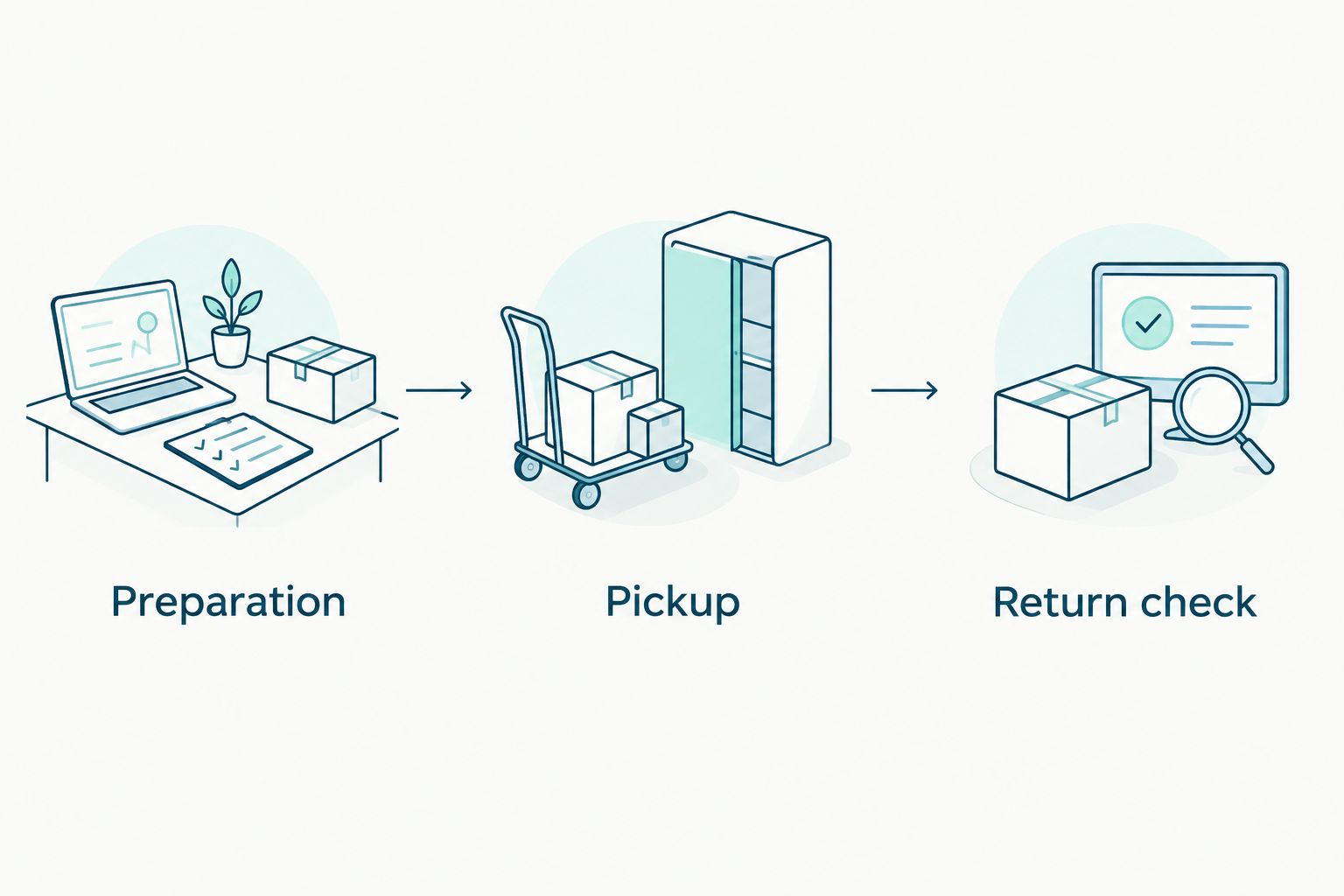
- Keep preparation, confirmed pickup, and return checks separate so staff can see what actually happened.
Why this matters
A calendar entry and a laundry booking are different things. Your maintenance calendar tells staff what to do; the service arrangement tells you when laundry is being collected or returned. Treating one as proof of the other leaves a tidy calendar attached to an unfinished job.
Hampr is best for property teams that want to hand off laundry pickup, washing, folding, and delivery. Your team still needs someone responsible for preparation, access, and putting the returned laundry where it belongs. Start with Hampr to review the service before building the calendar around it.
For your 2026 maintenance plan, separate these responsibilities instead of adding one vague event called laundry. That gives the cleaner a preparation task, the property contact a pickup record, and the next shift a clear return check. Less detective work, fewer loose ends.
Before you start
- Service access and confirmed details: Have access to your laundry service arrangement and verify that the property is within the service area. Keep the confirmed address, pickup information, and any supplied preparation instructions handy.
- Calendar access and a named owner: Use a Google account with permission to create events on the property's shared Google Calendar. Choose the person who will update the calendar when service details change, and confirm that the responsible staff can see it.
- The gotcha: recurrence is not a booking: A repeating event only repeats a calendar entry. Do not label future occurrences as confirmed pickups unless those service arrangements are actually confirmed.
Use the property's local time zone when entering timed events. A remote manager and an on-site cleaner can view the same event from different time zones, so check the time against the actual property location before saving.
Choose the right calendar workflow
Use confirmed-date events for changing schedules and recurring preparation reminders for a stable routine. Both workflows require someone to keep the service details current.
| Workflow | Best for | What it does well | Limitation |
|---|---|---|---|
| Confirmed-date events | Properties with changing laundry needs | Records the actual pickup information for each booking | Someone must create or update each event |
| Recurring preparation reminders | Properties with a regular laundry preparation day | Keeps the team's preparation task visible each cycle | Does not confirm or request a pickup |
Start with confirmed-date events. Add recurring preparation reminders only after the team understands the difference between a task reminder and a booked service. A repeating mistake is still a mistake, just better organized.
Property calendar setup
Create the shared task record
- Open Google Calendar on the web and select Create, then Event. Choose the property's shared calendar rather than your personal calendar, provided you have permission to add events there.
- Give the event a task-specific title, such as Laundry preparation — Cedar Court. Use your own property name and the actual preparation date; Cedar Court is only an example.
- Add the responsible staff member as a guest. In the event description, record who prepares the laundry, where the handoff happens, and which booking details still need confirmation.
- Select Save. Open the saved event and check that it appears on the intended property calendar, with the correct date and responsible person.
Expected result: Staff can find a preparation task on the shared calendar without mistaking it for a confirmed pickup. The event identifies the property and the person doing the work.
For a 2026 calendar containing multiple properties, use the same title pattern everywhere: task first, property second. Laundry preparation — Cedar Court is easier to scan beside Laundry pickup — Maple House than a collection of events called laundry day.
Do not put door codes, tenant information, or other sensitive access details into an event visible to everyone. Point authorized staff to your existing secure access instructions instead. The calendar should coordinate the work, not become a spare key drawer.
Add the confirmed pickup
- Create a separate event after you have confirmed the pickup details through the service arrangement. Title it Laundry pickup — followed by the property name.
- Enter the confirmed date and timing information. If the confirmation gives a window rather than a precise arrival time, record that window rather than inventing a single arrival time.
- Copy the relevant confirmation details into the description. Include the handoff location, the property contact, and any supplied instructions that staff need to follow.
- Select Save, then compare the event against the confirmation. Check the address, date, local time, and contact before treating the calendar entry as ready.
Expected result: The calendar reflects a real pickup arrangement. Anyone opening the event can distinguish confirmed details from your team's internal preparation instructions.
Keep preparation and pickup as 2 separate events. Preparation is your team's responsibility; pickup is the service milestone. Separating them lets you move a preparation task without accidentally changing the recorded service timing.
If you use an internal status note, write it plainly: Pickup confirmed or Confirmation needed. Avoid colors as the only status signal. A staff member opening an event from a notification still needs to understand the task from the title and description.
Set preparation reminders
- Open the preparation event and add a notification that gives the responsible person enough time to bag the laundry and follow the supplied instructions. Choose the lead time based on the property team's actual routine.
- Put the preparation checklist into the description. Identify the laundry to be collected, the approved staging location, and the person responsible for making it ready.
- Ask the responsible staff member to check their own notification settings. Do not assume that sharing an event guarantees everyone receives the reminder you expect.
- Save the event and run a small calendar test with the assigned staff member before depending on it for a real handoff.
Expected result: The responsible person can see the task, open its instructions, and receive the notification through their own calendar setup.
For your first 2026 trial, follow the task from the staff member's view rather than only the manager's view. Can they see the property name? Do they know where the laundry goes? Is the pickup information clearly marked as confirmed?
A reminder should answer a practical question, not merely announce that laundry exists. Replace Prepare laundry with an instruction that names the property, staging location, and owner. Follow the service's supplied preparation requirements rather than inventing bag, sorting, or labeling rules.
Add the return check
- Create a return-check event using confirmed return information when it is provided. If timing remains unconfirmed, create an internal task to check the return details rather than presenting a guessed delivery time.
- Assign the person who will receive or locate the returned laundry. Add the property's storage destination and the staff member responsible for putting it away.
- Ask that person to report receipt through your existing team communication process. Record completion without deleting the pickup information staff still need for reference.
- Save the return-check event and review the sequence: preparation, pickup, then return check. Make sure the next shift can understand it without asking the previous shift to explain.
Expected result: Returned laundry has an owner and a destination. The calendar tracks the handoff back to the property instead of stopping at collection.
Use 3 checkpoints for the workflow: preparation, pickup, and return check. These are recommended organizational steps, not a claim about service timing. Keep their status accurate even when one checkpoint moves.
Recurring preparation when maintenance repeats
A recurring reminder is best for a property that prepares laundry on a predictable day. It keeps the task in view, but someone still needs to arrange the service and copy confirmed details into the pickup event.
- Open the preparation event in Google Calendar. Select Does not repeat and choose the repeat pattern that matches your team's preparation routine.
- Keep the title focused on the internal task: Laundry preparation — followed by the property name. Do not change it to Confirmed pickup simply because it repeats.
- Add a description reminding the owner to check the service arrangement for that occurrence. Set a review point so the reminder does not continue unnoticed after the routine changes.
- Select Save. Inspect the next occurrence and confirm that its preparation timing still makes sense for the property.
Expected result: Staff receive a repeating preparation task while pickup records remain tied to actual confirmations. You get consistency without suggesting that a calendar event places an order.
For a 2026 recurring schedule, review the preparation pattern whenever staffing, occupancy, or maintenance routines change. A calendar can faithfully repeat an old plan long after that plan stops being useful.
Whenever a maintenance visit changes
If laundry preparation depends on a cleaner's visit, update the preparation event whenever that visit changes. Move the assigned task and notify the responsible person through your normal team process.
Next, check the confirmed pickup arrangement separately. Moving a calendar event does not reschedule the laundry service. Resolve the service timing through the service's own process, then update the calendar to match the new confirmation.
For more calendar-specific setup, use the guide to Google Calendar reminders for recurring pickups. Keep the same distinction there: a recurring reminder is a prompt to act, not evidence of a booking.
Troubleshooting
Staff cannot see the event
Check which calendar holds the event and whether the staff member has access to it. An event saved on a manager's personal calendar is not automatically part of the property's shared schedule.
Open the saved event, confirm the intended guests, and ask the assigned person to check it from their own account. Fix visibility before adding more reminders.
The reminder did not place a pickup order
A Google Calendar notification does not place an order in this workflow. Arrange the service separately and use the confirmed details to create or update the pickup event.
Rename any misleading recurring event to Laundry preparation or Check pickup arrangement. That makes the next required action clear.
The pickup time changed, but the calendar did not
Update the pickup event from the latest confirmation, then review the preparation and return-check tasks. Do not change only the event title while leaving the old timing behind.
Tell the responsible staff member about the change through your established communication process. Check that the revised time uses the property's local time zone.
Duplicate reminders appear
Look for a personal-calendar copy, a shared-calendar event, and an overlapping recurring series. Keep one authoritative preparation task on the intended property calendar.
Before deleting anything, identify which entry carries the correct guests and instructions. Remove only the extra task, not the confirmed pickup record.
Customize your workflow
Extend the calendar around responsibilities, not around more notifications. Add a stock-check task if your team needs to decide which property laundry requires service, or a storage task if returned items need to reach several locations.
Use the same description template across properties: task owner, property, handoff location, confirmed details, and completion responsibility. Keep the property-specific instructions distinct so staff do not follow one building's access process at another.
The laundry service guide for property managers is the next guide for a broader operating routine. Hampr handles the laundry service; your property calendar handles team coordination. Keeping those roles separate makes schedule changes easier to manage.
FAQ
How do I connect Hampr to a property maintenance calendar?
Use a shared calendar to record preparation tasks and confirmed pickup details. This guide describes a manual coordination workflow, not an automatic service-booking connection.
Does a recurring calendar event book my laundry pickup?
No, a recurring calendar event only repeats the calendar entry. Arrange the pickup separately and record the confirmed details on the property's calendar.
What is the best calendar workflow for changing property schedules?
Confirmed-date events are best for changing property schedules because they record each actual service arrangement. Keep recurring reminders limited to internal preparation tasks.
Can I use Google Calendar for laundry preparation reminders?
Yes, Google Calendar can hold preparation events and notifications. Assign the responsible person and check that they can see the event and receive notifications through their own settings.
What happens if I move the pickup event on my calendar?
Moving the event changes the calendar record, not the service arrangement. Resolve the pickup change through the service's own process, then update the calendar from the confirmation.
What should I include in a shared laundry event?
Include the property name, task owner, handoff location, and relevant confirmed timing. Keep sensitive access information in your existing secure process rather than a broadly shared event.
How should I review my laundry calendar in 2026?
Review the calendar whenever the property's staffing or maintenance routine changes. Check that preparation reminders still fit the schedule and that pickup events match current confirmations.
One last thing
Put the task in the event title, not just the description. Staff scanning a busy calendar should know whether to prepare laundry, handle a pickup, or check a return without opening every event.
That small naming choice makes the difference between a calendar that looks organized and one that tells people what to do. Bag it, follow the confirmed instructions, and let the calendar keep the handoffs straight.