
Instead of rebuilding your laundry plan every week, connect Hampr to Notion with a reusable checklist and dated reminders, then book your pickup separately through the service. This 2026 guide creates a manual planning workflow—not an automatic booking or order-status integration.
- Connect Hampr to Notion with a weekly laundry plan, not an automatic booking connection.
- Use Notion for pickup reminders, preparation tasks, and shared responsibility.
- Confirm the actual booking separately before marking your laundry plan as booked.
- Keep confirmed pickup details separate from your preferred laundry day.
Why this matters
A calendar entry that says laundry pickup is not a pickup reservation. Keeping those two things separate is the most important part of this setup: Notion organizes the work, while Hampr provides laundry pickup, washing, folding, and delivery for households and businesses in select US cities.
Hampr laundry pickup is best for households and businesses that want washing and folding handled outside their own routine. Pairing the service with a planning page gives everyone a place to check responsibilities, but this manual workflow requires you to copy confirmed details and update progress yourself.
The goal is simple: stop wondering whether someone booked the pickup, packed the laundry, or only thought about doing it. Your page should answer each question without another household group chat.
Before you start
- Access: Have a Notion account with permission to create a database. If you share the plan, each person who edits it needs access to that page.
- Booking details: Have access to your laundry-service account and any actual booking confirmation. Check whether the service covers your location before building your routine around it.
- The gotcha: A Notion reminder, checkbox, or status change in this setup does not submit an order or send instructions to the laundry service. Keep the booking step explicit.
For your 2026 setup, start with the manual version below. You do not need an API key, an automation subscription, or account passwords stored in a shared page.
Choose the responsibility model before building anything. Both approaches use the same database; the difference is who owns each week's checklist.
| Planning approach | Best for | Advantage | Limitation |
|---|---|---|---|
| Personal checklist | One person handling laundry | Fewer fields and clear ownership | Everyone else depends on that person updating it |
| Shared household plan | Roommates or families splitting tasks | Booking and preparation responsibilities stay visible | Shared access does not guarantee someone accepts a task |
Start with the personal checklist unless another person actually needs to edit the plan. Extra administration should not become the newest thing in your laundry pile.
Weekly laundry database
Build a small database rather than a long page of disconnected checkboxes. Each row represents a laundry cycle, giving you somewhere to keep its dates, owner, and confirmation notes together.
Create the planning table
- Select New page in Notion and name the page Weekly laundry plan.
- On the page, type
/tableand choose Table view to create a database rather than a simple table. - Rename the title property Laundry cycle. Use a clear row name such as Towels and everyday clothes.
- Add the properties below using the database's add-property control. Choose the specified property type, then enter your own property name.
These property names are your custom labels, not pre-existing service integration fields.
| Property name | Notion property type | What belongs here |
|---|---|---|
| Laundry cycle | Title | A short description of this batch |
| Plan status | Select | Your manually maintained planning stage |
| Planning reminder | Date | When you want to review and book |
| Confirmed pickup | Date | The pickup date copied from your actual confirmation |
| Owner | Person | The person responsible for checking the plan |
| Booking notes | Text | Confirmation details and practical notes |
For Plan status, create these options: Needs booking, Booked, Ready, Collected, and Returned. Treat them as household tracking labels, not live order statuses.
Leave Confirmed pickup empty until you have a real confirmation. A preferred date belongs in your planning notes, not in a field that claims the pickup is settled.
Expected result: You have one table where an unbooked plan looks different from a confirmed pickup. Nothing in the database sends information to the laundry service.
Keep the table easy to scan
Place Plan status, Planning reminder, Confirmed pickup, and Owner near the front of the table. Longer notes can sit farther right or inside the row's page.
Avoid adding fields just because Notion makes it easy. You need enough structure to answer what happens next—not an inventory system for every sock.
Reusable laundry checklist
Create a database template so each new laundry cycle starts with the same preparation steps. The template carries your routine; the date and confirmation still belong to the individual booking.
Build the template
- Open the menu beside New in your database and select New template.
- Name the template Weekly laundry checklist.
- Set its Plan status to Needs booking. Leave Confirmed pickup blank.
- Inside the template page, type
/to-doto add checkbox items. Use the checklist below as your starting point.
- Check what needs washing.
- Set aside items that need separate care or confirmation.
- Review the service's preparation instructions.
- Book the pickup through the laundry service.
- Copy confirmed pickup details into this page.
- Prepare the laundry according to the service's instructions.
- Check that the collection happened.
- Put away the returned laundry.
Do not prefill a template with last week's confirmation. Reusing the checklist is helpful; reusing an old booking is how a tidy-looking page becomes misleading.
For the physical preparation step, follow the service's current instructions rather than treating this checklist as a packing policy. The laundry pickup preparation guide gives that task its own place in your routine.
Expected result: Selecting your template creates a fresh checklist with no implied booking and no inherited pickup date.
Separate preparation from confirmation
Use the booking checkbox to record that you completed the booking action. Use Confirmed pickup to record the date actually confirmed by the service.
Those fields answer different questions. A completed checklist item without confirmation details should prompt a check of the real order, not an assumption that everything is arranged.
For a template created in 2026, keep changing details out of the reusable text. Dates, access arrangements, and one-off care requests belong in each cycle's notes.
Reminder and booking handoff
A useful reminder arrives while you can still act. Set the planning reminder before your preferred laundry day, then use the actual confirmation to organize preparation.
Add a planning reminder
- Create a row using New and your Weekly laundry checklist template.
- Open Planning reminder and select the date and time when you want to review your laundry needs.
- Open Remind in the date picker and choose the notification timing you want.
- For a weekly routine, start with a planning date 7 days after the previous planning session. Move it when your schedule changes.
- As a planning example, review the checklist 1 day before your preferred pickup day. This is a personal planning buffer, not a booking deadline or service promise.
Choose a reminder time when you can open the booking service. An alert during a meeting only moves the task from the laundry pile to the notification pile.
Expected result: The database contains a dated planning task with a reminder setting. You still need to complete and confirm the booking separately.
Copy confirmed details back into the plan
- Open Hampr separately and complete the booking process there.
- Check the resulting confirmation rather than relying on the date you originally wanted.
- Copy the confirmed pickup date into Confirmed pickup. If the confirmation includes a window, record it accurately in Booking notes.
- Change Plan status to Booked only after checking the confirmation.
- Add preparation notes that the household needs, without copying sensitive account information.
Expected result: Your planning page reflects a real booking. Any instructions intended for the service still need to be submitted through its own booking or communication process.
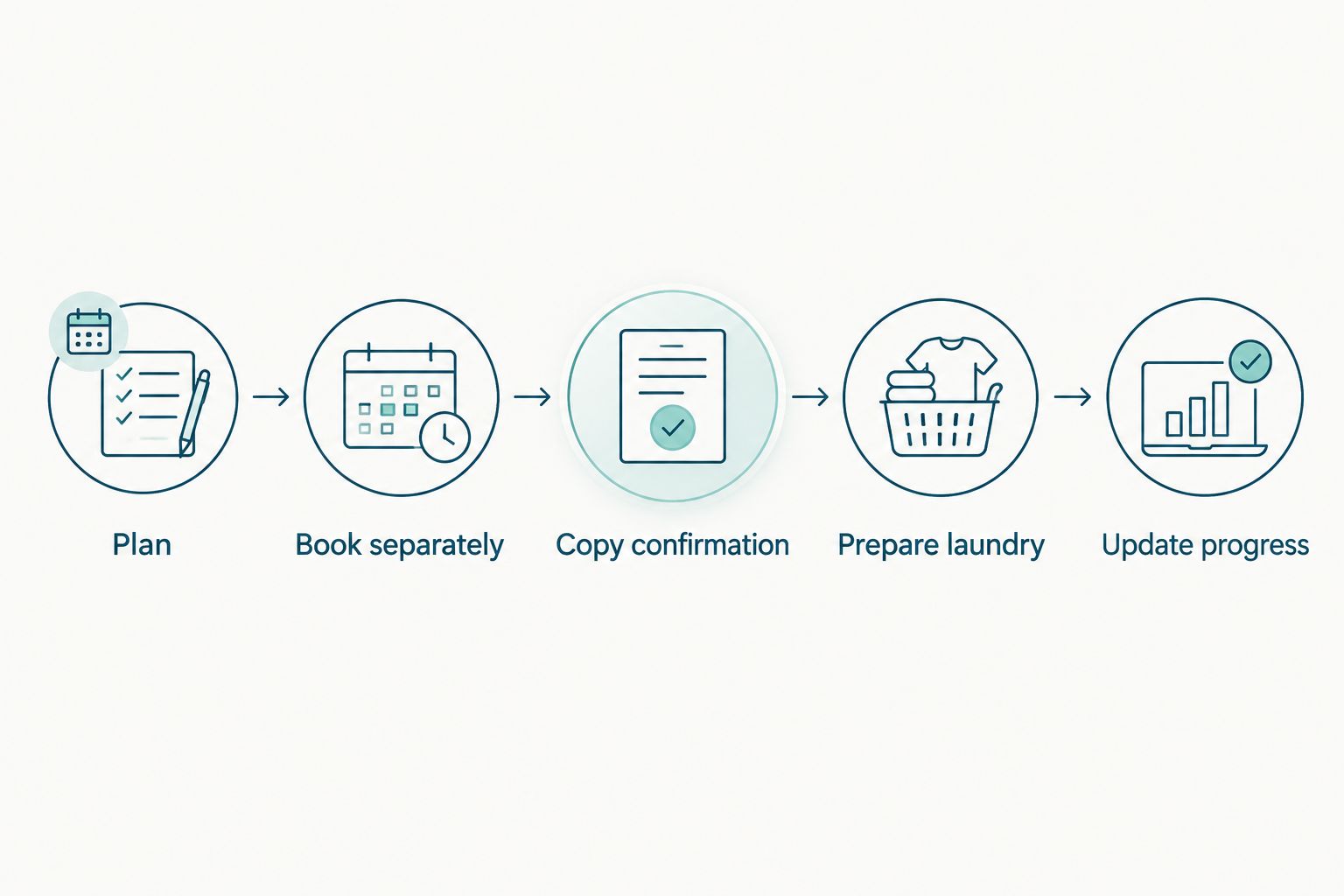
The handoff follows a simple sequence: Plan, Book separately, Copy confirmation, Prepare laundry, and Update progress. Notion holds the checklist around the order; it does not become the order system.
Workflow test and weekly reset
Test the plan before depending on it. A 10-minute walkthrough is a suggested setup exercise, not a promise about how long booking or laundry service takes.
Check the handoff
- Create a test row from your template and name it Practice cycle.
- Confirm that Plan status starts at Needs booking and Confirmed pickup is empty.
- Set a near-term Planning reminder using Remind. Check your Notion and device notification settings if you want an alert outside the page.
- Open the checklist and verify that booking remains a separate action. Do not place an unwanted order just to test the database.
- If you share the page, ask the other person to open the same row and confirm that they can make the edits you expect.
- Remove the test row when the walkthrough is complete.
Expected result: You know how the template, reminder, and shared access behave without confusing a practice task with a real order.
Reset after returned laundry
When the clothes come back, update Plan status to Returned after checking that the return happened. Then create the next cycle from your clean template rather than copying a completed row with old dates.
A useful 2026 housekeeping rule is to keep the next cycle unfinished on purpose. Blank confirmation fields are honest; stale confirmation fields only look organized.
When a confirmed pickup changes
The second workflow handles rescheduling. It uses the same table but reverses the handoff: change the actual booking first, then update your plan.
- Open the service's booking or support process and request the change there.
- Check the outcome before recording a new date as confirmed.
- Update Confirmed pickup and Booking notes to match the new confirmation.
- Review Planning reminder and any preparation reminder so an old alert does not send you rushing to the door.
- Tell anyone handling the laundry that the plan changed. Do not assume an edited page has been read.
Expected result: Your checklist follows the changed order instead of displaying the original plan. Editing a Notion date alone never counts as a rescheduling request in this workflow.
For shared households, assign a booking owner and write the preparation owner's name inside the checklist if those jobs differ. Ownership works best when the person has agreed to it—not merely appeared in a field.
Troubleshooting
The reminder appeared, but no pickup was booked
A reminder prompts an action; it does not place an order in this setup. Complete the booking through the service, check its confirmation, and only then change Plan status to Booked.
The date is correct, but no notification appeared
Open the date property and check Remind. Then check Notion's notification preferences and your device's notification permissions; a date without a reminder setting is not a notification instruction.
A new cycle contains an old pickup date
The template contains booking-specific information, or you copied a completed cycle instead of using the clean template. Clear Confirmed pickup in the template and review the new row before using it.
A household member cannot edit the checklist
Open Share and check the person's access to the page and database. Confirm that the person is signed into the account you invited before changing permissions more broadly.
The service did not receive a note from the page
Notes entered only in Notion stay in the planning workspace in this setup. Submit any service instructions through the service's supported process and keep only a reference copy in the checklist.
Customize your workflow
Add complexity only when it removes a real point of confusion. A separate cycle for household towels makes sense if someone manages it separately; a separate database for each person usually adds more places to check.
For a shared plan, add a short handoff note after booking: who prepares the laundry and where the household can find the confirmed details. Keep door codes, passwords, and payment information out of broadly shared notes.
You can also add a return reminder based on the actual return information supplied with your order. Do not turn a hoped-for return date into a confirmed one just to fill the calendar.
Keep the order confirmation as the source of truth and Notion as the working checklist. That division makes the plan useful without pretending it can see changes made elsewhere.
FAQ
How do I connect Hampr to Notion for a weekly laundry plan?
Create a Notion database with a reusable checklist, a planning reminder, and a confirmed pickup date. Book separately through the laundry service, then copy the confirmed details into the database.
Does this setup automatically book my laundry pickup?
No, this setup is a manual planning workflow, not an automatic booking integration. A reminder or status change in Notion does not submit an order.
Can Notion track my laundry order automatically?
This workflow does not automatically track laundry orders. Update the planning status yourself after checking the actual order information or confirming that collection or return happened.
What is the best Notion layout for a weekly laundry plan?
A small database with one row per laundry cycle is the best fit for this workflow. Keep the status, planning reminder, confirmed pickup, owner, and booking notes together.
Can I share the laundry checklist with my roommates?
Yes, you can share the Notion page and give roommates appropriate access. Agree on who books and who prepares the laundry rather than relying on a shared checkbox alone.
Will changing the Notion date reschedule my pickup?
No, changing a Notion date does not reschedule the actual pickup in this workflow. Request the change through the service, check the confirmation, and then update your planning page.
What should I review in my laundry planner in 2026?
Review the next planning reminder, the confirmed pickup details, and who owns the preparation tasks. Remove stale dates from the reusable template and keep service instructions in the actual booking process.
One last thing
An empty confirmation field is more useful than a guessed date. It tells you exactly what still needs doing.
Keep that distinction visible, and your laundry planner becomes a practical handoff instead of another optimistic to-do list. Bag it when the instructions say to, book it separately, and let the checklist handle the remembering.