
Instead of recalculating everyone’s share after each pickup, use a spreadsheet and a recurring reminder to split a Hampr laundry bill with Venmo, then approve each request yourself. This workflow automates the math and the nudge—not Venmo requests, payments, or withdrawals.
- Split Hampr laundry bill with Venmo using calculated shares, a recurring reminder, and manually approved payment requests.
- Hampr handles laundry pickup, washing, folding, and delivery; keep household reimbursement separate from the laundry order.
- Use equal shares for shared loads and custom shares when household members agree to different contributions.
- Check the final bill and recipient before requesting money; a request is not a completed payment.
Why this matters
A shared laundry order creates two separate jobs: getting the clothes cleaned and settling up afterward. Hampr provides laundry pickup, washing, folding, and delivery for households and businesses in select US cities. Your household still needs an agreed way to divide the bill.
Hampr laundry pickup is best for households that want washing, folding, and delivery handled together. The service handles the laundry; the workflow below handles your shared expense record.
For your 2026 household setup, keep those records separate. Paying a laundry provider and receiving a roommate’s reimbursement are different transactions, even when they concern the same socks.
The benefit is repeatable bookkeeping without handing payment decisions to an unattended process. The trade-off: someone still checks the bill, sends requests, and confirms payment. That review is deliberate.
Before you start
- Have the right access. You need the final laundry bill, a spreadsheet you can edit, a calendar or reminder app, and a Venmo account. Each person reimbursing you needs an account they can use to pay you.
- Agree on the split first. Decide who participates, whether you share equally, and how to handle personal items or later adjustments. Confirm each person’s Venmo username directly rather than guessing from a display name.
- Separate reminders from money movement. A calendar notification does not create a Venmo request, and a request does not collect payment. Do not build this workflow around automatic withdrawals or share account passwords to make it feel automatic.
Use a final bill rather than an earlier estimate. Otherwise, you are automating the wrong number—and nobody wants a second household meeting about towels.
Choose your household split
Use equal shares when everyone agrees the laundry is a shared household expense. Use custom shares when the household has already agreed that contributions should differ. Neither method measures what someone owes until you define the rule.
| Split method | Best for | How it works | Advantage | Limitation |
|---|---|---|---|---|
| Equal shares | Households pooling laundry expenses | Divide the agreed shared total by participating people | Simple to calculate and explain | Does not account for different laundry quantities |
| Custom shares | Households with agreed unequal contributions | Assign each person a percentage of the shared total | Follows your household’s agreement | Requires agreement and careful percentage checks |
Do not treat a bag count as a billing rule unless that matches the actual bill and your household agreement. A bag is a physical container, not automatically a fair unit of reimbursement.
For a new 2026 arrangement, write the rule in the spreadsheet before entering the first bill. Include whether the person paying the provider also contributes a share. In a shared household split, that person’s contribution belongs in the calculation, not in a request to themselves.
Bill record and share calculations
Start with a spreadsheet that answers three questions: which order is this, what is the final total, and what portion belongs to each person? Keep 1 row per order in the summary so separate pickups do not blend together.
The bold labels below are fields you create in your spreadsheet. They are not settings inside either service.
- Create a sheet named Laundry ledger. Add columns for Order reference, Final total, Participants, Equal share, Requests sent, and Payment status.
- Put the final amount in cell B2 and the number of participating people in C2. Include the person who paid when that person shares the expense.
- Enter
=ROUND(B2/C2,2)in D2. This calculates an equal share rounded to 2 decimal places. - Create a separate participant list with each person’s name, confirmed Venmo username, assigned share, request date, and payment status. Keep usernames out of publicly shared documents.
- Check that all assigned shares add back to the final total before sending requests.
Expected result: you can trace each requested contribution to a particular order and reproduce the calculation without searching a group chat.
Handle rounding before sending requests
Rounding individual shares can leave a small difference between their sum and the bill. Assign that difference consistently—for example, to the person paying the provider—and make the rule visible to everyone.
Do not fix a rounding mismatch by quietly changing another person’s contribution. The ledger should explain the split, not create a puzzle for whoever checks it later.
For custom shares, replace Participants with a participant-level percentage column. Use =ROUND($B$2*E2,2) where B2 contains the final total and E2 contains that person’s percentage. Confirm that the percentages total 100 percent, then check the rounded amounts against the bill.
Reminder setup and handoff
Create a recurring reminder that tells you to review the laundry bill, not to assume a charge has happened. A reminder is a task prompt; it does not confirm pickup, delivery, or billing.
- Create a calendar event or reminder titled Review laundry bill. Use your household’s usual laundry rhythm to choose when it repeats.
- Add a short checklist to its notes: confirm final bill, check participants, calculate shares, review existing requests, send remaining requests.
- Add a reference to your private ledger so you can find it without searching through unrelated files.
- Set 1 reminder per laundry cycle as your starting rule. Adjust it to your actual routine instead of creating several overlapping prompts.
- When the reminder arrives, check whether there is a new final bill. If not, leave the ledger unchanged and move the task to a suitable review time.
Expected result: a recurring prompt brings you back to the same checklist without creating payment requests on its own.
For a 2026 household routine, name one person responsible for the review. A shared reminder without a clear owner can leave everyone waiting for someone else to handle it.
If laundry reminders are already scattered across your phone, use the guide to laundry-day reminders with Apple Reminders to plan that part of the routine separately. Keep the payment checklist attached to the bill review, not to the moment you put a bag outside.
Venmo requests and payment checks
Send requests only after the spreadsheet passes the total check. Keep 1 request per person per order as your tracking rule, excluding the person who already paid the provider.
- Open Venmo and select Pay/Request. Find the intended recipient using the username you confirmed with them.
- Compare the recipient’s profile with your agreed contact details. Stop if the identity is unclear; do not choose the first matching name.
- Enter that person’s calculated share. Add a short note identifying the laundry order or service date without including your home address or other sensitive details.
- Choose Request, then review the recipient and amount before completing the request. Do not choose the payment action when you intend to ask for reimbursement.
- Record the request date in your ledger and mark the contribution Requested, not Paid.
- Change the ledger to Paid only after checking the completed payment in your own Venmo account.
Expected result: every request matches an agreed share, and the ledger distinguishes money requested from money received.
Keep request notes neutral. A service date and a plain description are more useful than a running commentary about whose gym clothes caused the situation.
Your private ledger should also distinguish Requested, Partially paid, and Paid. Those are labels you create, not a claim that every app uses the same status wording.
Review payment activity before following up. A roommate might pay separately rather than responding to the original request. Match the sender, amount, and note before deciding the contribution remains unpaid.
Variant: reconcile several orders together
A grouped settlement is best for households that prefer fewer reimbursement requests. Its advantage is a shorter request list; its drawback is that someone carries the shared expense until settlement.
For a 2026 grouped-settlement routine, choose an agreed review interval and keep recording each order individually. Grouping reimbursements should not erase the underlying bill history.
- Record every final laundry bill as its own order in the ledger.
- Calculate each participant’s share for each order using the agreed rule.
- At settlement time, total each person’s unpaid contributions. Exclude anything already reimbursed or already covered by an outstanding request.
- Send a request with a note identifying the settlement period, then record which order rows it covers.
- Confirm the completed payment before marking those contributions paid.
Expected result: each grouped request traces back to individual orders without requesting the same contribution twice.
If different people paid different laundry bills, calculate each person’s contributions and amounts already paid before requesting reimbursement. Do not simply add all bills together and ask everyone for an equal portion again; that would ignore the money some participants already contributed.
Troubleshooting
The shares do not add up to the bill
Check the participant count, percentage entries, and rounding adjustment. Confirm that the formula includes the person who paid when that person also owes a household share.
For custom splits, check that a percentage was entered as a percentage rather than a whole-number multiplier. Reconcile the total before requesting money.
The reminder appeared, but there is no final bill
Leave the request unsent. Move the review task rather than treating a calendar date as proof that an order is ready to settle.
The reminder schedules your attention, not the provider’s billing process.
The same contribution was requested twice
Compare both requests with the order reference and request date in your ledger. Tell the recipient which request is valid and resolve the duplicate before sending another follow-up.
Prevent repeats by checking Requests sent before opening the payment app.
Someone says they paid, but the ledger says unpaid
Check your own transaction history for a completed payment from the correct person. Do not mark an entry paid based only on a screenshot or a message.
If the payment is absent, ask the sender to check the recipient and transaction status in their account. Do not ask them to send again until the first payment’s status is clear.
The final bill changed after requests went out
Update the original order record and calculate the difference for each participant. Explain the adjustment before requesting more money or arranging repayment.
Do not create another full-bill entry. That makes the same laundry order look like two separate expenses.
Customize your workflow
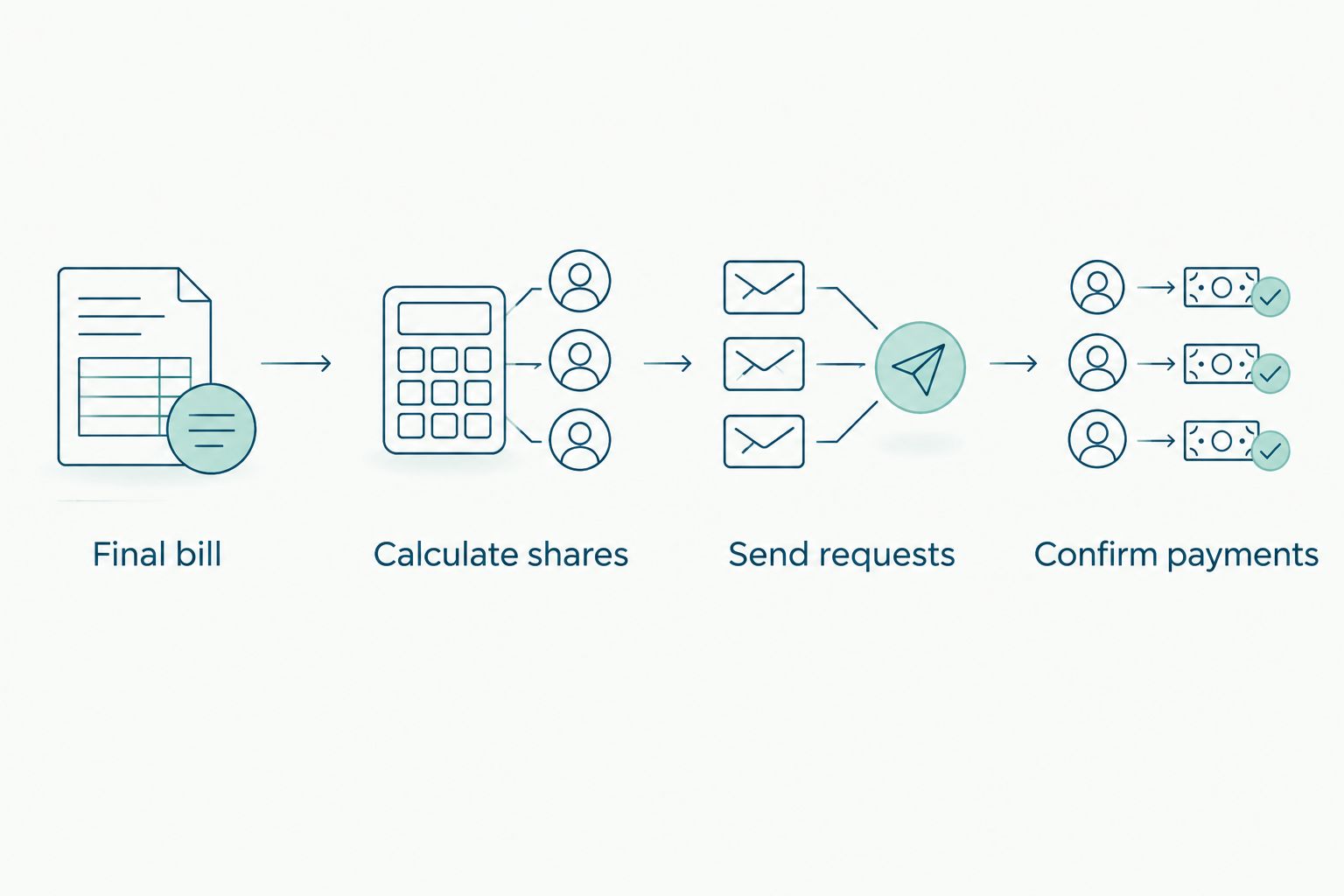
Keep the same sequence as your household changes: Final bill, Calculate shares, Send requests, Confirm payments. Change the participants or split rule only for the orders affected, and preserve earlier records.
A useful next step is to separate laundry preparation from reimbursement. One reminder gets the clothes ready; another reviews the completed bill. That keeps an unfinished pickup from turning into an early payment request.
For your next 2026 review, check whether equal shares still fit the household. If someone moves out or stops participating, update the next order’s participant list before calculating—not after sending requests.
FAQ
How do I split a Hampr laundry bill with Venmo?
Use the final laundry bill to calculate each participant’s agreed share, then send a Venmo request to each person reimbursing you. Record requests separately from completed payments.
Does this workflow automatically send Venmo requests?
No. This workflow calculates shares in a spreadsheet and uses a recurring reminder, while you review and send each Venmo request yourself.
Can I automatically withdraw my roommate’s share?
This workflow does not authorize or perform automatic withdrawals. Each participant handles their payment through their own account.
Should the person who paid be included in the split?
Yes, if that person shares the household expense. Include their contribution in the calculation, but do not send them a reimbursement request for their own share.
What is the best way to split unequal laundry contributions?
Use custom shares agreed before settlement. Record each person’s percentage, confirm the percentages total 100 percent, and reconcile the rounded amounts with the final bill.
Can I combine several laundry bills into one Venmo request?
Yes, you can total a person’s unpaid contributions across several recorded orders and request that amount together. Exclude contributions already paid or covered by an outstanding request.
When should I mark a laundry contribution as paid?
Mark a contribution paid after confirming the completed payment in your own account. Sending a request or receiving a screenshot does not establish that the money arrived.
One last thing
Your reminder is not the trigger for a payment request; the checked final bill is. Keep that distinction and the routine stays useful even when laundry day moves around. Automate the arithmetic, then give the money a human once-over.